Bypass Pangram AI Detection
Paste a draft from ChatGPT, Claude, Gemini, or any model. Humanio rewrites the robotic tells so it reads human and passes Pangram and other AI detectors like GPTZero, Turnitin & Originality.ai. Try it on your own draft.





- Bypass all popular AI detectors
- Keep the original meaning
- Choose the desired level of readability






What Is a Pangram AI Detector Bypass Tool?
A Pangram AI detector bypass tool helps you improve AI-generated writing so it reads less like a machine draft and more like natural human writing. If you're looking for how to bypass Pangram, the goal should not be to make a few random changes on the surface. A stronger approach is to reduce repetitive structure, generic phrasing, and overly polished patterns that make the text feel artificial or impersonal.
With Humanio AI, you can take rough AI output and turn it into a cleaner draft that is easier to review, personalize, and align with the way real people actually write. This makes it useful as a Pangram humanizer when your original draft sounds overly formulaic.
How Does Pangram Detect AI Writing?
The Pangram AI detector analyzes the text itself for patterns associated with AI-generated writing. According to Pangram, its detection model looks at signals such as writing style, word choice, syntax, and grammatical structure rather than simply checking whether the same text exists somewhere online.
- writing style
- word choice
- syntax
- grammatical structure
Pangram also explains that its classifier is trained on both human-written and AI-generated documents. This allows it to evaluate patterns across a piece of writing and estimate whether the text appears human-written, AI-generated, or AI-assisted.
- AI-generated
- AI-assisted
- Human-written
That is also why simply swapping a few words may not meaningfully change how a draft reads. A better revision focuses on the writing itself: sentence structure, phrasing, rhythm, specificity, and the writer's own voice.
Why the Pangram AI Detector May Flag AI Writing

- Too smooth
- Too even
- Too predictable
Raw AI text often sounds too smooth, too even, and too predictable from sentence to sentence. It may rely on safe wording, repeated phrasing, and tidy transitions that make the writing feel formulaic instead of personal. That can be a problem when you need your draft to sound natural, believable, and closer to your own writing style.
The issue is not only whether the Pangram AI detector flags the text. Even before that, weak AI writing can feel disconnected from the person behind it. If the tone, rhythm, and structure all feel overly processed, the final draft may still feel incomplete or generic.

How Humanio AI Helps
Humanio AI helps you turn rough AI-generated writing into something more natural and more readable. We reduce stiff phrasing, improve sentence flow, and make the draft feel less formulaic while preserving the original meaning. Instead of forcing you to manually rewrite every section from scratch, our tool gives you a stronger base to work from.
This is useful when you already have solid ideas in the draft but need the final version to sound more personal and more believable. The result is a cleaner working version that is easier to refine and easier to make your own.
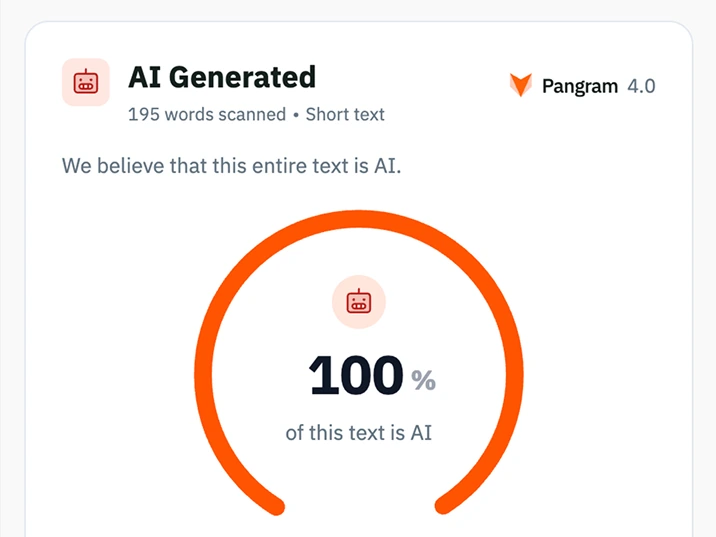
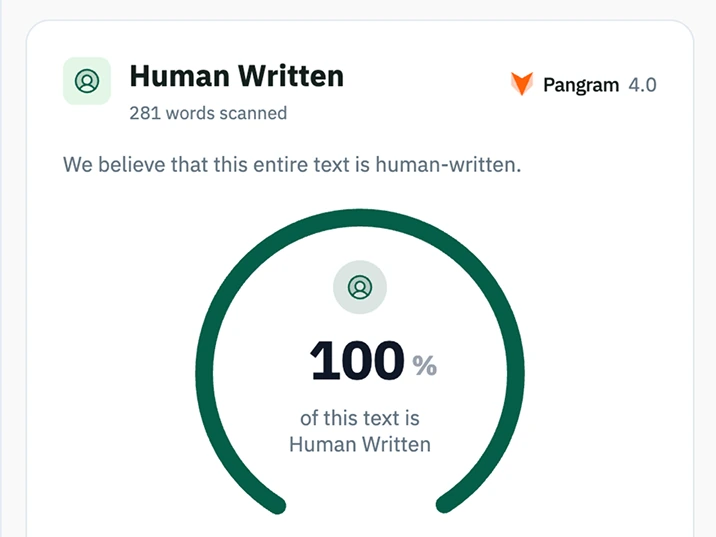
Before and After in Pangram
How to Humanize AI Text for Pangram
Paste or upload the draft you want to improve.
Choose how strongly you want the text to be humanized.
Review the rewritten output and compare tone, clarity, and structure.
Make final edits so the result matches your own voice, intent, and context.
Core Features
More Natural Phrasing
Humanio AI helps reduce robotic wording, repetitive sentence patterns, and generic phrasing so the final draft sounds smoother and more human.
Better Tone and Flow
You can use our tool to make a draft sound more personal, more direct, and more aligned with the way real people naturally express ideas.
Meaning Preservation
Strong revision should improve the delivery without changing the point. Humanio AI is built to preserve the substance of the draft while improving readability and variation.
Faster Revision Process
Instead of spending hours manually reworking every paragraph, you can start from a cleaner version and focus on the final edits that matter most.
What You Get
- You get writing that feels less generic and less machine-generated
- You save time when improving rough AI drafts
- You keep your core message while making the text easier to read
- You get a version that is easier to personalize before submission or publication
- You reduce the risk of relying on text that still sounds overly processed or uniform
Who This Tool Helps
Bloggers and Content Writers
If you work with AI-generated article drafts, outlines, or long-form content, our tool helps make the writing feel less templated and more natural for real readers.
ESL and International Writers
If you want your writing to sound smoother and more natural without losing your original meaning, Humanio AI can help you improve tone and clarity more efficiently.
Students
If you use AI for brainstorming, outlining, or drafting coursework, Humanio AI helps you turn that rough material into writing that feels more personal and more usable for real assignments.
FAQ





Use it responsibly. Humanio is for humanizing writing you own — drafts, ideas, and content you're allowed to publish or submit. Follow the AI-use policies of your school, employer, or client. Humanio improves how your work reads; it doesn't replace your judgment or your honesty.