Humanizer for Perplexity: Make Its Drafts Sound Human
A Perplexity draft is usually accurate in shape and flat in voice. The sentences are even, the transitions are stock, and every paragraph ends with a tidy summary. The fastest fix is to run the draft through a humanizer that rewrites at the sentence level, then check the result against your sources. That is what Humanio’s AI Humanizer is built for: it rewrites awkward phrasing, cuts repetition, improves flow, and keeps your meaning and keywords in place.
Below you will find what a humanizer does to a Perplexity draft, a step-by-step routine for marketing copy, essays, blog posts and work emails, and a straight account of what AI detectors can and cannot tell you.
TL;DR
- A humanizer for Perplexity text is a rewriting step: it fixes stiff phrasing, repetition and rhythm so the draft reads like a person wrote it.
- Perplexity drafts lean on sourced claims, so the order matters: lock the facts and links first, rewrite second, verify third.
- Choose the editing intensity to fit the job: light edits for emails and polished drafts, a structural rewrite for stiff, repetitive text.
- AI detectors are inconsistent and publishers of detectors themselves say scores should not be the sole basis for action. Write for readers first.
- Students should follow their school’s AI policy and disclose use where it is required.
Table of Contents
- What a humanizer for Perplexity actually does
- Light edit or full rewrite: choosing the intensity
- A step-by-step routine for humanizing Perplexity text
- Adapting the draft to the job
- What AI detectors can and cannot tell you
- Why sentence-level rewriting beats synonym swapping
- Prompting Perplexity for a better starting draft
- Promo: from stiff draft to readable copy
- A quick quality checklist before you publish
- FAQ
- Sources
What a humanizer for Perplexity actually does
Perplexity is an answer engine. It searches, summarizes and attaches numbered sources. That makes its drafts dense with claims and short on personality. Common patterns:
- Sentences of similar length, one after another.
- Openers like “It is worth noting that” and closers that restate the paragraph.
- Claims stacked in a list-like rhythm, with little connective reasoning.
- Repeated key terms where a person would use a pronoun or a shorter phrase.
A humanizer works on exactly these surface features. It varies sentence structure, trims repetition, loosens formal phrasing and smooths transitions. Our approach at Humanio is sentence-level rewriting rather than swapping words for synonyms, because a synonym swap leaves the rhythm untouched and often damages precision. You choose how far it goes, from light edits to a more substantial rewrite, and the aim is to preserve your meaning, your keywords and your voice.
A humanizer does not research. It cannot add a first-hand example, a fresh statistic or your opinion. Those come from you, and the routine below shows where they go.
Light edit or full rewrite: choosing the intensity
Most people pick the wrong setting because they treat every draft the same. Match the intensity to the problem.
| Your situation | Best starting point | Why |
|---|---|---|
| A work email or short reply drafted by Perplexity | Light edit | The content is fine, the tone is just formal |
| A blog post you already restructured | Light to medium | You need rhythm and word choice, not new structure |
| A raw, repetitive research summary | Substantial rewrite | Paragraph shape and sentence patterns need to change |
| An essay draft you will add your own argument to | Medium, then edit by hand | The humanizer fixes phrasing, you supply the thinking |
| Marketing copy with fixed brand terms | Light to medium | Keywords must stay put |
If unsure, start light. It is easier to push a draft further than to recover a nuance you wanted to keep. Our guide to the difference between a humanizer and a paraphraser explains why a rewrite aimed at flow behaves differently from a tool that only rewords.
A step-by-step routine for humanizing Perplexity text
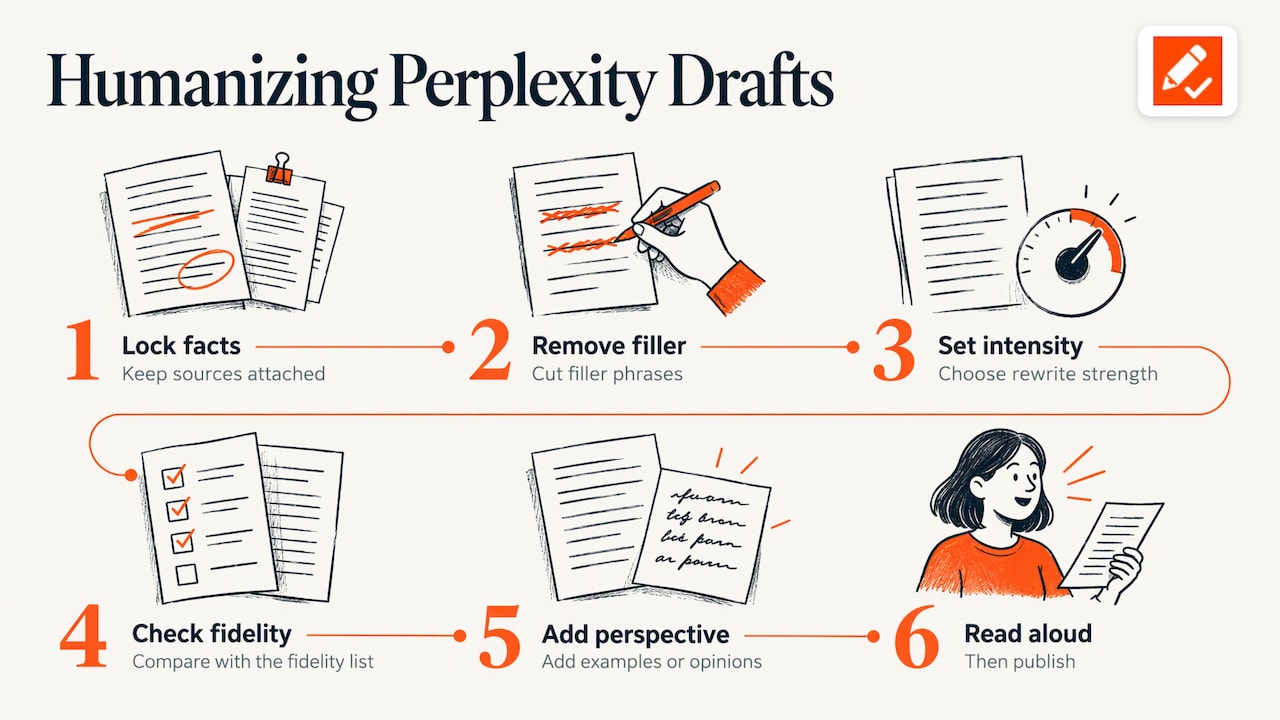
Perplexity’s strength is that its claims point to sources. The routine protects that strength while you change the prose.
Step 1: Lock the facts before you touch the wording
Copy the draft into a working document. Next to each claim, note the figure, date, name or quote that must survive, and the source it came from. This is your fidelity list. It takes ten minutes on a long draft and saves you from the usual failure, which is a smooth paragraph that has quietly shifted a number or softened a qualifier.
Do not skip the sources themselves. Open the ones behind your key claims and confirm they say what the draft says. Summaries, however well sourced, can compress a finding into something slightly stronger than the page states.
Step 2: Remove filler yourself
Before any tool runs, delete the obvious padding: scene-setting openers, “in conclusion” paragraphs, sentences that announce what the next sentence will say. Shorter input gives the rewrite less to smooth over and leaves a tighter result.
Step 3: Run the humanizer at the right intensity
Paste the text into the Humanio AI Humanizer and pick the intensity from the table above. Process in sections if the piece is long, so you can see what changed in each one. Reviewing a three-paragraph block is far easier than comparing two 2,000-word documents.
If you want to see how a draft reads to a detector first, the free AI Detector gives you a quick view of AI signals before and after. Treat it as feedback on style, not a verdict.
Step 4: Compare against your fidelity list
Read the output next to your list from Step 1. Check every number, date, name, unit and quote. Check the qualifiers too: “may”, “in some cases”, “according to one study”. A good rewrite keeps them, and your job is to confirm it. Then confirm each citation still sits beside the claim it supports. If you moved a sentence, the link has to move with it.
Watch for causal glue. Two sourced statements joined by “which is why” can create a claim no source made. If the sources do not state the connection, rewrite the sentence to say only what they do.
Step 5: Add what only you can add
A humanizer fixes the surface. The content that makes a piece yours is a specific example, a number from your own work, a mistake you made, an opinion a source does not hold. Add two or three of these per section. Research on post-edited AI drafts presented in 2026 suggests that editing moves text closer to a person’s own style but does not erase every trace of the model. A sample of your real writing is a better guide than a vague instruction to sound human, so keep a paragraph you wrote and read the draft aloud against it.
Step 6: Read it out loud and publish
Read the final version aloud. Where you stumble, a reader will too. Fix those sentences, run a spell check, and do a last pass on links.
Adapting the draft to the job
The same routine bends depending on where the text is going.
Marketing copy
Brand terms, product names and claims are the fixed points. List them in Step 1 and confirm they appear unchanged. Then work on rhythm: marketing copy that reads like a report loses the reader in the first line. Use shorter sentences at the top of a section, one specific proof point per paragraph, and a single clear action at the end. Perplexity gives you the research; the humanizer and your edit give it a voice.
Blog posts
Bloggers get the most from the medium setting. Keep your headings and keywords, let the rewrite vary the paragraph openings and sentence lengths, then add your own anecdotes. Links to sources should stay on the exact words that make the claim, not drift to the end of a paragraph after the rewrite.
Essays
Essays are where Perplexity drafts are most tempting and most risky, because your instructor wants your reasoning. Use the draft as a research map, not the argument. Rebuild the thesis in your own words, use the humanizer to smooth phrasing in sections you have already thought through, and cite the original sources rather than the summary. Humanio has a page on humanizing essay drafts and one on academic writing if that is your use.
Check your school’s rules first. Policies on AI assistance differ by course and instructor, and many require you to disclose the tools you used. If your policy asks for disclosure, give it. If it is unclear, ask your instructor before you submit.
Professional communications
For emails, reports and proposals, use a light edit. The goal is a warmer, more direct register, not a different message. Read for tone against the recipient: a note to a client should not sound like an encyclopedia entry. If your employer has an AI-use policy, follow it.
What AI detectors can and cannot tell you
Many readers come to a humanizer worried about detectors. It helps to know what the evidence says, because it should shape how much effort you spend on it.
Detectors estimate the probability that text was machine-written. They are not proof. Turnitin’s own AI writing detection FAQ says it needs at least 300 words of long-form English prose to score a document, shows scores of 1 to 19% only as an asterisk, and states that the percentage should not be used as the sole basis for action or a definitive grading measure. It also says a document scored at 50% could contain more AI writing than that figure suggests.
Independent research points the same way:
- A 2023 study that tested 14 detection tools on 54 documents found none were accurate or reliable: all scored below 80% accuracy, and machine paraphrasing dropped overall detection accuracy to 26%. The same study found false accusations of human-written text ranged from 0% to 50% depending on the tool, and concluded the reports cannot be the only basis for accusing students.
- A 2024 study in Frontiers in Education found false-positive rates on human student text of 15.8% for GPTZero and 9.8% for ZeroGPT, and concluded that detectors cannot be the only metric for determining AI use.
- A 2023 study across 32 university courses found that running ChatGPT text through a paraphrasing tool raised the false-negative rate from 32% to 95% for GPTZero.
The practical reading is that detector results swing with the text, the tool and the day. Humanio has been tested with popular detectors including GPTZero, ZeroGPT and Pangram, and results can vary depending on the text and the detector. That is why we suggest you aim for writing that is clear, specific and yours, and treat any score as one signal. If you want to understand what detectors look for, our article on how AI content is detected walks through the patterns and writing signals.
If a specific checker matters for your work, we have pages on Turnitin, Pangram and Copyleaks that cover how Humanio approaches each.
Why sentence-level rewriting beats synonym swapping
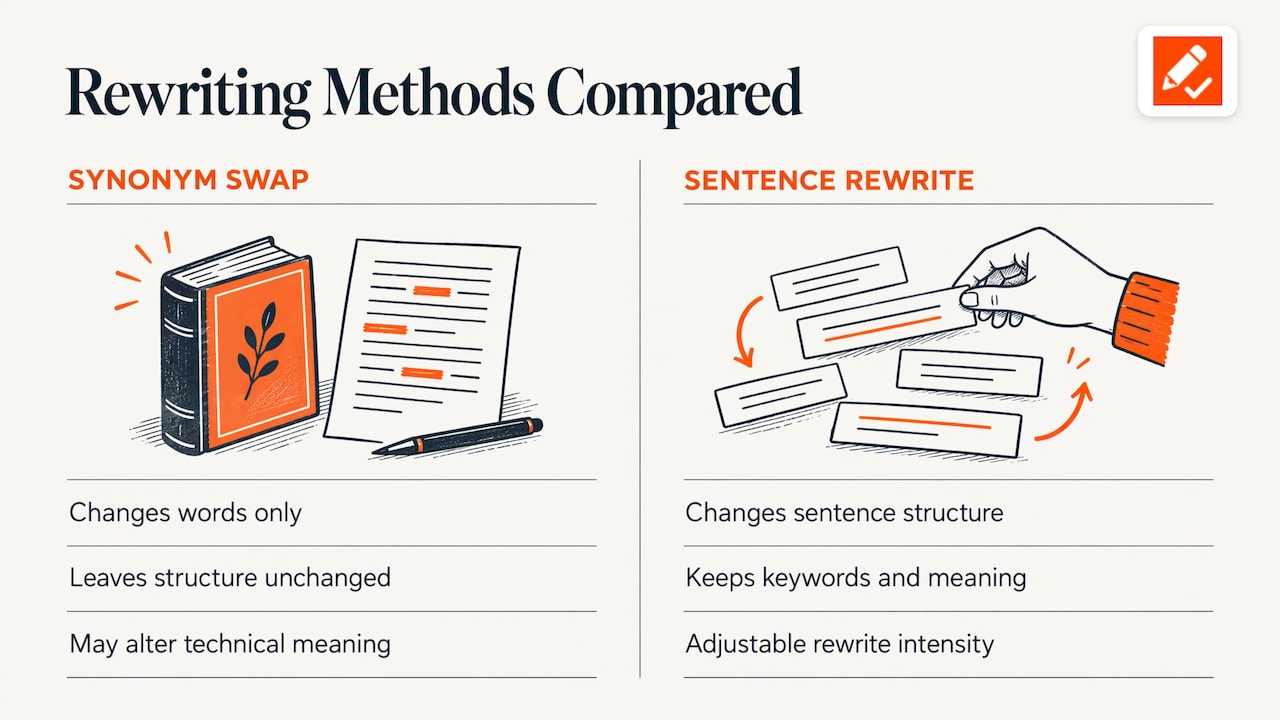
Synonym tools change words and leave structure alone. Detectors and human readers both notice structure: uniform sentence length, predictable transitions, the same paragraph shape from top to bottom. A synonym swap also risks accuracy. A technical term replaced with a loose cousin can change what you are claiming.
Sentence-level rewriting changes how ideas are expressed: it merges short sentences, splits long ones, reorders clauses and rewrites the connective tissue. Done well, the keywords and meaning stay put while the rhythm changes. That is the design behind Humanio, with adjustable intensity so you decide how much of your draft is touched.
Prompting Perplexity for a better starting draft
You can reduce the humanizing work by improving the input. Ask Perplexity for an outline with sources first, approve it, then request one section at a time in the length and register you want. Tell it your audience, give it a short sample of your own writing, and ask for plain wording. Section-by-section drafts are also easier to verify than a single long answer. Our prompts page has ready-made instructions for getting more natural writing out of an AI model.
Promo: from stiff draft to readable copy
If you produce Perplexity drafts regularly, the routine above is faster with the right tool. Humanio’s AI Humanizer rewrites at the sentence level, lets you choose between light edits and a deeper rewrite, and is built for marketers, bloggers, students, professionals and freelancers who need readable text for articles, essays, emails and websites.

Plans are published on the pricing page: Starter is $6.99 per week, Pro is $9.99 per week and Business is $19.99 per week. You can also browse all Humanio tools to see what else fits your workflow.
A quick quality checklist before you publish
- Every number, date, name and quote matches its source.
- Qualifiers such as “may” and “in some cases” survived the rewrite.
- Each citation sits next to the claim it supports.
- No sentence claims a cause the sources do not state.
- Your own example, data point or opinion appears in each major section.
- The text reads naturally aloud and sounds like you.
- You have followed any school, employer or publisher AI policy and disclosed use where required.
FAQ
Can I humanize Perplexity text and keep the citations?
Yes, if you treat citations as fixed points. Note which claims carry which sources before you rewrite, then confirm after the rewrite that each source still sits beside its claim. Re-open the key sources to confirm they say what the sentence now says.
Is a humanizer the same as a paraphraser?
Not quite. A paraphraser mostly rewords. A humanizer rewrites sentences for flow, rhythm and tone while keeping meaning and keywords. Our comparison of the two explains where each fits.
Will a humanized Perplexity draft pass every AI detector?
No tool can promise that, and detectors disagree with each other. Published studies show wide variation in accuracy and false positives, and Turnitin itself says its percentage should not be the sole basis for action. Humanio has been tested with detectors such as GPTZero, ZeroGPT and Pangram, with results varying by text and detector.
Can students use a humanizer on a Perplexity essay?
Students can use it to smooth phrasing in work built on their own thinking, but should check their school’s AI policy and disclose use when it is required. Build the argument yourself, cite the original sources, and use the tool for readability.
How much should I edit by hand after humanizing?
Enough to make it yours. Add at least one specific example or first-hand detail per section, check every fact against your notes, and read the piece aloud. That final pass is usually 10 to 15 minutes for a standard blog post.
Sources
- Turnitin’s AI writing detection capabilities FAQs
- Testing of Detection Tools for AI-Generated Text (2023)
- Students are using large language models and AI detectors (Frontiers in Education, 2024)
- Perception, performance, and detectability of conversational AI across 32 university courses (2023)